
Why Combine Both Tools?
NeuronWriter excels at NLP-based content scoring. It analyzes top-ranking pages and gives you a real-time optimization score based on term frequency, entity coverage, and semantic relevance. Agility Writer excels at generating complete, long-form articles from SERP data at scale. Together, they create a workflow where AI drafts the content and NeuronWriter verifies it meets optimization benchmarks.
Using Agility Writer alone produces articles with built-in SERP optimization, but running them through NeuronWriter adds a second layer of validation. You can identify gaps in entity coverage, missing subtopics, and over-optimized sections that might trigger keyword stuffing signals. The combined approach consistently produces content that scores 80+ in NeuronWriter's optimizer, which correlates strongly with first-page rankings.
The time savings are substantial. Without AI, creating a NeuronWriter-optimized article takes four to six hours of research, writing, and iterating on the score. With this workflow, you generate the article in minutes, then spend thirty to sixty minutes refining it in NeuronWriter's editor. That is an 80% reduction in production time per article.
Step 1: Keyword Research in NeuronWriter
Start by creating a new project in NeuronWriter for your target keyword. NeuronWriter will analyze the top-ranking pages and generate a list of recommended terms, entities, and questions to cover. Review this data to understand what Google expects from content on this topic. Pay attention to the "must include" terms that appear in most top-ranking articles, as these are non-negotiable for competitive rankings.
Export or note the key findings: primary terms, secondary terms, questions to answer, and the recommended content structure (number of headings, paragraph length, total word count). This information will help you evaluate the AI-generated content in the next step.
Step 2: Generate Content in Agility Writer
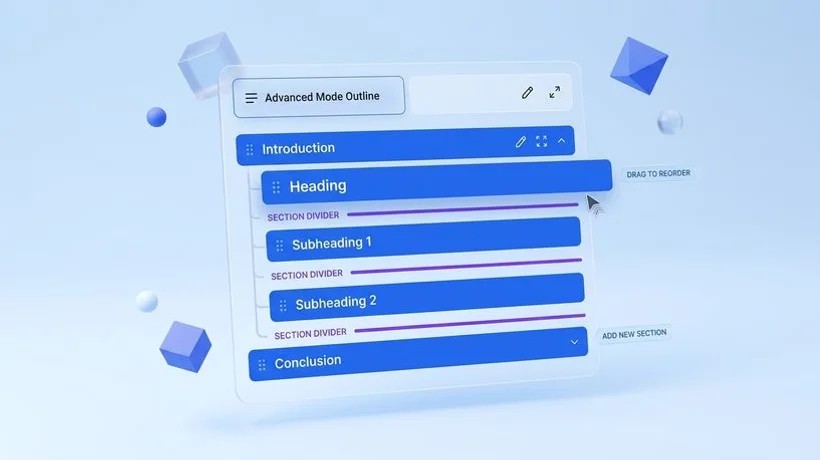
Open Agility Writer and enter the same target keyword. Use Advanced Mode if you want to customize the outline, or 1-Click Mode for a fully automated draft. Agility Writer will perform its own SERP analysis and generate a complete article with headings, entities, and structured content based on what currently ranks.
If you are using Advanced Mode, incorporate insights from NeuronWriter's analysis. Add any missing subtopics that NeuronWriter identified to the outline before generation. Ensure the headings cover the questions NeuronWriter flagged as important. This front-loads the optimization and reduces the amount of editing needed in the next step.
For batch workflows, you can generate multiple articles in Bulk Mode and then optimize each one through NeuronWriter sequentially. This parallel approach maximizes throughput for content teams managing dozens of articles per week.
Step 3: Optimize in NeuronWriter
Copy the generated article into NeuronWriter's content editor. The optimizer will immediately score your content and show which recommended terms are present, which are missing, and which might be overused. Focus on three areas:
- Missing entities: NeuronWriter highlights terms that top-ranking articles use but your content does not. Add these naturally into relevant sections. Do not force them; find logical places where the entity fits the context.
- Term frequency: Check that your primary keyword and important secondary terms appear at the right frequency. AI-generated content occasionally over-optimizes for the main keyword while under-representing important related terms.
- Content gaps: Look for questions in NeuronWriter's recommendations that your article does not address. Add a new section or expand an existing one to cover these gaps.
Target a NeuronWriter score of 80 or higher. Most articles generated by Agility Writer start at 60 to 75, so you typically need to add a few hundred words of targeted content and adjust term usage to reach the optimal range. This refinement process takes thirty to sixty minutes per article, compared to the four-plus hours of writing from scratch.
Step 4: Final Review and Publish
After reaching your target NeuronWriter score, do a final human review. Check for factual accuracy, brand voice consistency, and natural readability. Ensure the introduction hooks the reader, the conclusion includes a clear call to action, and all internal links point to relevant pages on your site.
Publish directly from Agility Writer's WordPress integration, or export the content for your CMS. The article is now optimized by two independent analysis engines, reviewed by a human editor, and ready to compete for first-page rankings from day one.
Workflow Comparison: Time Per Article
| Task | Manual Writing | AW + NeuronWriter |
|---|---|---|
| Keyword Research | 45 min | 15 min |
| Outline & Structure | 30 min | 5 min |
| Drafting | 2-3 hours | 3 min (AI) |
| Optimization | 45 min | 30 min |
| Review & Publish | 20 min | 15 min |
| Total | 4-5 hours | ~1 hour |