Standard API Protocol
Request & Response
Completion Callbacks

What You Can Build with the API
The Agility Writer API gives developers full programmatic access to article generation, content retrieval, and account management. Any workflow you can perform in the Agility Writer dashboard, you can automate through the API. This opens up possibilities that go far beyond what the web interface supports.
Common use cases for the API include: building custom content management dashboards that integrate AI writing alongside editorial workflows, creating automated pipelines that generate articles from keyword databases on a schedule, connecting Agility Writer to proprietary CMS platforms that do not have native integrations, and building white-label solutions where your clients generate content through your interface while Agility Writer powers the backend.
Agencies use the API to build client-facing portals where customers submit keywords and receive finished articles without ever logging into Agility Writer. SaaS companies embed AI writing capabilities into their own products. SEO tool builders add content generation as a feature alongside their existing keyword research and rank tracking functionality.
Core API Endpoints
The API is organized around a few core operations that cover the entire content generation lifecycle:
- Generate Article: Submit a keyword and configuration options (article length, tone, mode) to start generating an article. The API returns a job ID for tracking.
- Check Status: Poll the status of a generation job using its ID. Status values include queued, processing, completed, and failed.
- Retrieve Content: Once generation is complete, retrieve the full article content in HTML or Markdown format, including meta title, meta description, and heading structure.
- List Articles: Retrieve a list of all generated articles with filtering by date, status, and keyword.
- Account Info: Check your remaining credits, usage statistics, and plan details.
Authentication
API authentication uses Bearer tokens. Generate your API key from the Agility Writer dashboard under Settings, then API Keys. Include the key in the Authorization header of every request. API keys can be regenerated at any time if compromised, and you can create multiple keys with different permission scopes for different applications.
All API requests must be made over HTTPS. Rate limits apply per API key: 60 requests per minute for status checks and content retrieval, 10 requests per minute for article generation. These limits accommodate the vast majority of use cases. If you need higher limits for enterprise workloads, contact the support team.
Example Workflow: Automated Content Pipeline
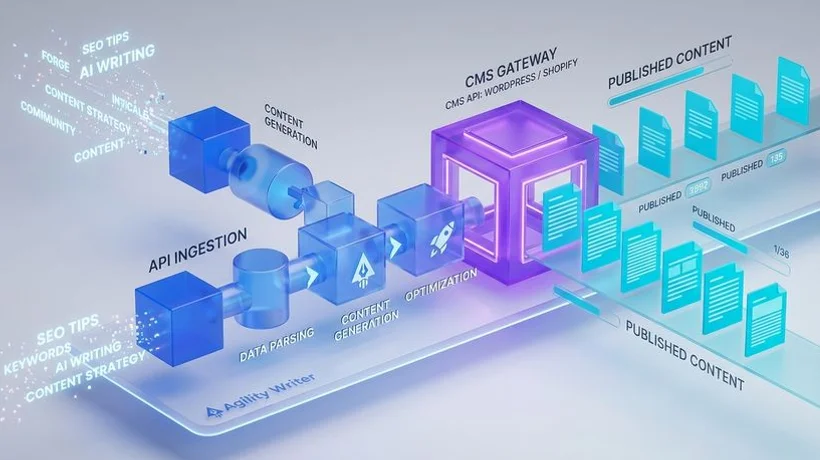
Here is a practical example of an automated content pipeline built with the API:
- Keyword ingestion: Your system reads a list of target keywords from a Google Sheet, database, or keyword research tool export.
- Job submission: For each keyword, your script calls the Generate Article endpoint with your preferred configuration (1-Click Mode, 2,000+ words, SEO-optimized).
- Status monitoring: A background process polls the Check Status endpoint every 30 seconds for each active job, tracking progress from queued to completed.
- Content retrieval: When a job completes, the script retrieves the full article content via the Retrieve Content endpoint.
- Publishing: The article is automatically published to your CMS via its own API (WordPress, Webflow, custom), or queued for human review in your editorial dashboard.
- Notification: Send a Slack message or email to your content manager with the article title, URL, and any flagged issues.
This entire pipeline runs without human intervention. A single developer can build it in a day, and it can produce dozens of articles per week on autopilot. The only human touchpoint is the optional review step before publishing.
Webhook Callbacks
Instead of polling for completion, you can configure webhook URLs that Agility Writer calls when articles are ready. This event-driven approach is more efficient for high-volume workflows. When a generation job completes, the API sends a POST request to your webhook URL with the job ID and status. Your server then retrieves the content and processes it according to your pipeline logic.
Webhooks eliminate the need for polling infrastructure and reduce API calls. They also enable real-time processing: the moment an article is ready, your system can publish it, send notifications, or trigger downstream workflows without any delay.
Getting Started
To start using the API, sign up for an Agility Writer account, navigate to Settings, then API Keys, and generate your first key. The API documentation is available in your account dashboard with detailed endpoint descriptions, request and response examples, and code samples in Python, JavaScript, and PHP. Start with a single article generation request to verify your setup, then build up to more complex automated workflows.